
Introduction – React
The library for web and native user interfaces
ko.react.dev
위 문서를 참고하여 작성하였음
Vite 써서 새로운 리액트 프로젝트 하나를 만드려고 했는데 못보던 옵션이 생겼다.
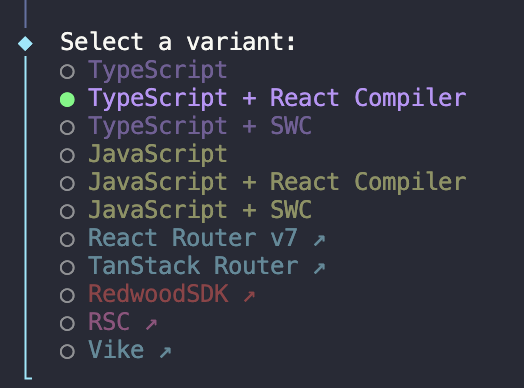
어떤 변화가 있을지 궁금하여 React Compiler에 대해 알아보았다.
React Compiler 란
"React Compiler automatically applies the optimal memoization, ensuring your app only re-renders when necessary."
React Compiler는 자동 메모이제이션을 최적으로 적용하여, 앱이 필요할 때만 리렌더링되도록 보장한다.
그렇다면 이 자동 메모이제이션이 정확히 어떤 효과를 내는 것일까? 🤔
React Compiler’s automatic memoization is primarily focused on improving update performance (re-rendering existing components), so it focuses on these two use cases:
1. Skipping cascading re-rendering of components
2. Skipping expensive calculations from outside of React
1. 부모 컴포넌트가 리렌더될 때, 변경되지 않은 자식 컴포넌트의 불필요한 리렌더링을 스킵한다.
2. 컴포넌트 내부에서 호출되는 무거운 계산 함수의 재실행을 방지한다.
메모이제이션을 자동으로해준다라는 말은 곧 useCallback, useMemo, React.memo와 같은 메모이제이션 도구들을 컴파일러가 알아서 대체해주는 방식으로 보인다.
덕분에 불필요한 최적화 코드를 줄일 수 있고 코드 구조가 단순해져 유지보수 측면에서 확실한 이점을 기대할 수 있을 것 같다.
그럼 해당 훅들이 필요가 없는걸까? 🤔
개발을 하다 보면 특정 연산이나 컴포넌트에 대해 명시적으로 의존성을 관리하고 싶어지는 상황은 존재할 것이다.
아래 공식문서 내용을 살펴보자.
However, in some cases developers may need more control over memoization. The useMemo and useCallback hooks can continue to be used with React Compiler as an escape hatch to provide control over which values are memoized. A common use-case for this is if a memoized value is used as an effect dependency, in order to ensure that an effect does not fire repeatedly even when its dependencies do not meaningfully change.
수동 memoization이 필요할 경우 "escape hatch"로 사용될 수 있다고 명시되어있는데 직역하면 "탈출구"로 프로그래밍 맥락에서는 "자동 시스템이 처리하지 못하는 경우에 개발자가 수동으로 개입할 수 있는 방법" 정도로 이해하면 된다.
따라서 기존 memoization훅들(useCallback, useMemo, React.memo)은 컴파일러와 충돌 없이 사용이 가능하다.
예제 코드
// vite.config.ts
// TypeScript + React Compiler
import { defineConfig } from 'vite'
import react from '@vitejs/plugin-react'

export default defineConfig({
  plugins: [
    react({
      babel: {
        plugins: [['babel-plugin-react-compiler']],
      },
    }),
  ],
})
1. React Compiler를 사용했을때
import { useState } from 'react';
import { calculateExpensiveValue } from './calculateExpensiveValue';

const WithReactCompiler = () => {
  const [, rerender] = useState({});

  // React Compiler가 활성화되어있기 때문에 리렌더링 되더라도 매번 계산을 수행하지 않음.
  const expensiveValue = calculateExpensiveValue(10);

  console.debug('✅ Parent Component With React Compiler');

  return (
    <div>
      <h2>With React Compiler</h2>
      <p>계산 결과: {expensiveValue}</p>
      <button onClick={() => rerender({})}>Rerender</button>
      <ChildComponent />
    </div>
  );
};

const ChildComponent = () => {
  console.debug('✅ Child Component With React Compiler');
  return <div>ChildComponent</div>;
};

export default WithReactCompiler;
2. 사용하지 않았을때
import { useState } from 'react';
import { calculateExpensiveValue } from './calculateExpensiveValue';

const WithoutReactCompiler = () => {
  // 이미 React Compiler가 활성화되어있기 때문에 명시적으로 써줘야함. (=일반 리액트)
  // https://ko.react.dev/learn/react-compiler/debugging
  'use no memo';

  const [, rerender] = useState({});

  // React Compiler 없이는 매번 값비싼 계산 실행
  const expensiveResult = calculateExpensiveValue(10);

  console.debug('❌ Parent Component Without React Compiler');

  return (
    <div>
      <h2>Without React Compiler</h2>
      <p>계산 결과: {expensiveResult}</p>
      <button onClick={() => rerender({})}>Rerender</button>
      <ChildComponent />
    </div>
  );
};

const ChildComponent = () => {
  console.debug('❌ Child Component Without React Compiler');
  return <div>ChildComponent</div>;
};

export default WithoutReactCompiler;
(참고) expensiveResult 함수 로직
export const calculateExpensiveValue = (input: number) => {
  console.debug('🔁 값비싼 계산 실행 중...');

  for (let i = 0; i < 100000000; i++) {
    // 의도적으로 무거운 작업 수행
  }

  return input * 2;
};
결과
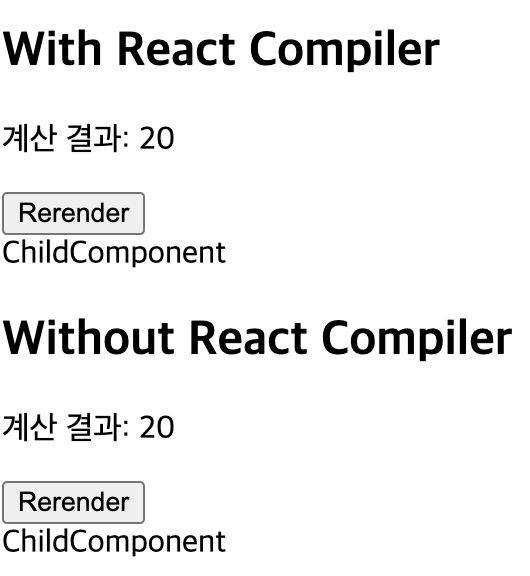
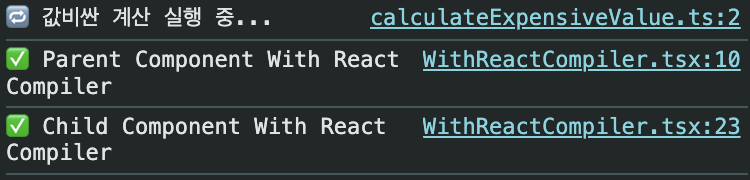
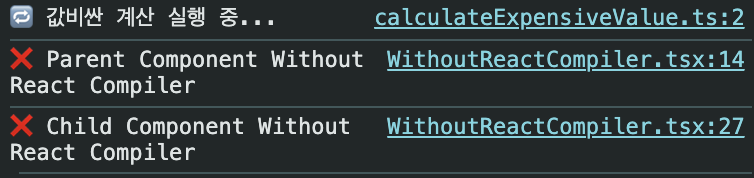

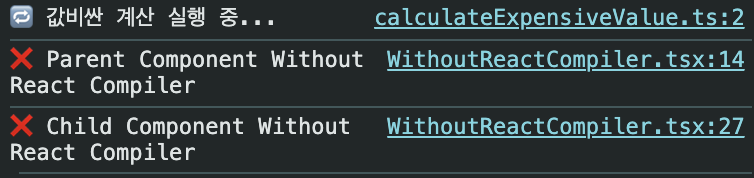
PlayGround에서 React Compiler의 내부 동작을 직접 확인해볼 수도 있다.
React Compiler Playground
playground.react.dev
WithReactCompiler 컴포넌트를 Playground에 입력하면, 내부적으로 다음과 같이 캐싱이 처리되는 모습을 볼 수 있다.
const $ = _c(3); // 3개의 캐시 생성

// 1. useState의 초기값 캐싱
let t0;
if ($[0] === sentinel) {
  t0 = {};      // 첫 렌더링만 객체 생성
  $[0] = t0;
} else {
  t0 = $[0];    // 이후엔 같은 객체 재사용
}

// 2. 값 메모이제이션 (expensive calculation)
let t1;
if ($[1] === Symbol.for("react.memo_cache_sentinel")) {
  t1 = calculateExpensiveValue(10);  // 첫 렌더링: 계산 실행
  $[1] = t1;                         // 캐시 저장
} else {
  t1 = $[1];  // 재렌더링: 캐시에서 가져옴
}

// 3. 컴포넌트 (JSX) 메모이제이션
let t2;
if ($[2] === Symbol.for("react.memo_cache_sentinel")) {
  t2 = <div>...</div>;  // 첫 렌더링: JSX 생성
  $[2] = t2;            // 캐시 저장
} else {
  t2 = $[2];  // 재렌더링: 캐시에서 가져옴
}

let t3
'기능' 카테고리의 다른 글
| [CI/CD] Github Self Hosted Runner 도입 경험 (0) | 2025.11.04 |
|---|